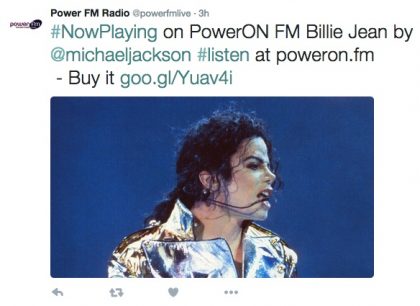
Twitter Auto Post is our service that allows you to post your Radio and TV stations ‘Now Playing’ songs or videos to your Twitter feed.
We offer a hosted service that can grab your 'Now Playing' song or video from any compatible streaming server (we support Shoutcast v1, Shoutcast v2, Icecast, RadioJar, SAM Cloud, Tikilive, Radio.co, CAST, Live 365, Centova Cast, Airtime Pro and many more) and then add an image*, tag the artist* and then send it over to your Twitter feed. Simple as that!
You can customise the message with each post, set the frequency of each post, add hashtags, emoticons, turn features on and off, all from our custom built control panel (see screenshots below).
Don't just post the names of the songs to your Twitter account for your followers to see, give them something extra... Give them a photo of the artist or cover art (selectable via the control panel*), tag the artist* with each song and even monetize your Twitter feed by adding 'Buy this song' links to each tweet which can link to your Apple iTunes or Amazon affiliate accounts.
There are loads of additional features such as the ability to filter out Jingles, promos and adverts and even adding custom images for artists and creating entries for artists not in our database. All configurable via the control panel.
Each Twitter Auto Post account comes with our 'Static' and 'RSS' posting features. With 'Static' posting, you can schedule up to 20 independent messages (with images) to post to your Twitter feed at regular intervals or specific times of the day. Ideal for posting show info!
The 'RSS' posting allows you to schedule up to 5 independent RSS feeds to post to your Twitter feed at regular intervals or specific times of the day. Ideal for posting blog or website updates, news or weather updates, etc...
All this for free with each account!
Please Note! Twitter have recently made changes to their API which limits automated posting to 500 automated posts per month.
Simply visit this page, select the Twitter Auto Post service, create an account and submit the info.
Sure, you can visit our demo channels Twitter page, just click here and you'll see it in action posting the "Now Playing" songs on our test station, Hit Music 90's
Sign up here, then create a Twitter Developer account here, enter the Twitter App details onto our control panel and then configure how often you want to send the tweets, that's it! Please note that you need your own Twitter Developer account and create an app before you can use this service, full details are in our Help section.
* Please note : We use a third party database for image and Twitter account matching. Please be aware that not every artist is in this database and that due to the vast number of artists and bands, omissions and errors may occur.
Please note that from 1st July 2018 you will now have to create a ‘Developers Account’ on the Twitter platform in order to create a Twitter App. required for us to be able to post to Twitter on your behalf. From 2024 Twitter now limit their free tier to 500 posts per month (approx. one automated tweet every 2 hours).