Chat Widget

Chat Widgets

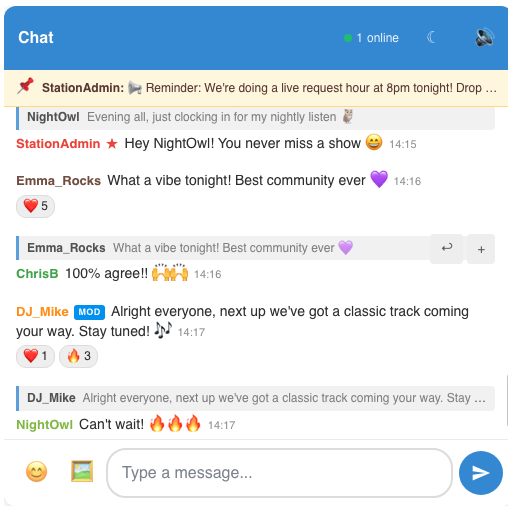
Our Chat Widget lets you embed a fully featured, real-time chat room directly onto your website!

Your visitors can chat with each other and with your admin team, all without leaving your site.

The widget is fully customisable to match your branding and comes packed with powerful moderation tools to keep conversations safe.

Simply configure your chat via our control panel, copy the embed code, and paste it wherever you want the chat to appear. That's it!

Features

  • Responsive & mobile friendly
  • Easy embed code
  • Real-time messaging
  • Emoji reactions & picker
  • Reply & quote messages
  • Custom fonts & colours
  • Show full/only populated week
  • Admin moderation tools
  • User banning & muting
  • Profanity filter (block or mask)
  • Slow mode & flood protection
  • Browser & sound notifications
  • Scheduled/automated messages
  • Responsive Widgets
  • Upload presenter/show images

How does it Work?

Simple! Simply sign up using the link below, copy and paste the embed code in your website. That's it! You can of course, customise the look and feel by adjusting the colour scheme to match your website.

Is there a demo?

Yes! Further down the page you can see the chat widget live in action. Give it a try!

Can I moderate the chat?

Absolutely! Log in as an admin directly within the widget, or manage everything from the control panel. Ban users by IP, mute disruptive users, set up a profanity filter, enable slow mode, and delete messages — all with just a few clicks.

Can I customise the look?

Yes! Customise fonts, background colours, header colours, admin name colours, enable dark mode, and much more to match your website's branding perfectly.

Want to see what it will look like?

Below is a live demo of the full schedule widget.


Simply visit this page, select the Schedule Widgets service, create an account and submit the info.

Sure, just further up the page we show you the full Schedule widget live in action.

Simple, just sign up using the link above, select the 'Schedule' Widget service, then via our control panel enter your schedule via the easy "Outlook" style calendar view. Then embed the widget wherever you want it to display. That's it!